
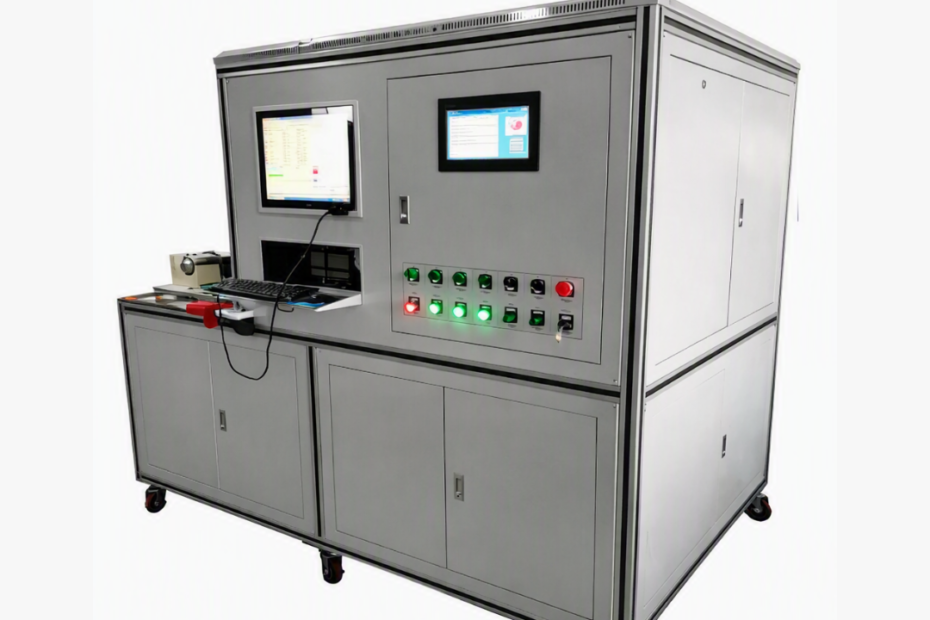
Industrial products and components often undergo functional, performance, endurance, and quality testing before moving to the next stage of production. As testing requirements become more complex, relying entirely on manual measurements can make testing difficult to repeat, scale, and trace.
Automated Test Systems (ATS) combine test hardware, software, measurement instruments, sensors, and data acquisition (DAQ) to execute and monitor testing with minimal operator intervention.
An automated test system does more than simply execute tests automatically. It applies defined test conditions, captures measurements, evaluates results against specified limits, and records test data.
What Is an Automated Test System?
An Automated Test System is a combination of instruments, controllers, software, sensors, fixtures, and data acquisition hardware used to execute predefined test sequences.
Depending on the application, an automated test system can:
- Apply electrical, mechanical, thermal, pressure, or other test conditions
- Measure the response of the device under test (DUT)
- Acquire and process measurement data
- Compare measured values with defined limits
- Control the sequence of test operations
- Generate pass/fail results
- Store test data for traceability and analysis
Automated test systems are commonly used for functional testing, performance testing, product validation, R&D testing, and end-of-line testing.
1. Hardware: The Physical Layer of the Test System
Hardware provides the physical connection between the automated test system and the device under test (DUT). It applies test conditions and captures the physical response of the product.
Depending on the application, this layer may include:
Test Instruments
Common instruments include:
- Digital multimeters
- Power supplies
- Oscilloscopes
- Signal generators
- Pressure sensors
- Temperature sensors
- Load cells
- Flow sensors
- Torque sensors
The selection depends on the required measurement range, accuracy, resolution, and response time.
Switching Systems
Relay matrices and switching modules allow the system to automatically route signals between the DUT and measurement instruments.
This becomes particularly useful when multiple test points or measurement channels must be handled without manually reconnecting instruments.
Fixtures and DUT Interfaces
Fixtures provide the physical connection between the product and the test equipment.
A good fixture should provide reliable connections, consistent product positioning, easy loading and unloading, and appropriate safety provisions.
Controllers and Control Hardware
Depending on the application, control hardware may include:
- Industrial PCs
- PLCs
- PXI-based systems
- CompactRIO
- Motion or actuator controllers
The hardware architecture should be based on the number and type of signals, required test throughput, expansion requirements, and environmental conditions.
2. Software: Controlling the Test Process
Software coordinates the different operations performed by the automated test system.
The software layer can manage:
- Test sequencing
- Instrument communication
- Data acquisition
- Measurement calculations
- Limit checking
- Pass/fail evaluation
- Operator interfaces
- Data logging
- Report generation
- Test traceability
LabVIEW is commonly used in industrial test applications for instrument communication, data acquisition, measurement, control, visualization, and test logic.
NI TestStand can also be used for structured test-sequence management, result processing, reporting, and execution control.
A well-designed test application should be modular. This allows engineers to add new test steps, instruments, or measurement channels without redesigning the entire software application.
For example, a test sequence may follow:
Initialize → Safety Check → Apply Test Condition → Acquire Measurement → Evaluate Limit → Record Result → Continue Test
This structured approach helps maintain consistency across repeated test cycles.
3. Data Acquisition (DAQ): Capturing Measurement Data
Data acquisition is the measurement layer that allows physical signals from sensors and measurement devices to be captured and processed by the test system.
A DAQ setup can include:
- Analog inputs
- Digital I/O
- Counter/timer signals
- Signal conditioning
- Sensor interfaces
- Isolation
- Synchronization
- Analog-to-digital conversion
For example, in a pressure testing application, a pressure sensor produces an electrical signal corresponding to the measured pressure. The signal can be conditioned and acquired through the DAQ system before the software processes it and compares it against the defined test limits.
Important DAQ Selection Factors
DAQ selection should consider:
- Channel count
- Sampling rate
- Resolution
- Input range
- Signal type
- Signal conditioning
- Sensor compatibility
- Synchronization
- Isolation requirements
The DAQ should be selected according to the complete measurement requirement rather than simply choosing the highest sampling rate or largest channel count.
How Hardware, Software and DAQ Work Together
The real value of an Automated Test System comes from the interaction between its hardware, software, and measurement layers.
Consider a simplified industrial test sequence:
Step 1: Test Initialization
The software initializes the required instruments, DAQ channels, controllers, and safety conditions.
Step 2: Apply the Test Condition
The control system commands the relevant hardware to apply the required stimulus to the DUT.
This could involve voltage, current, pressure, flow, temperature, torque, movement, or another application-specific condition.
Step 3: Measure the DUT Response
Sensors and measurement instruments detect the response of the DUT.
Step 4: Acquire the Measurement
The measurement signals are conditioned and acquired through the DAQ or appropriate measurement hardware.
Step 5: Process and Evaluate
The software processes the acquired data and compares the values against predefined limits.
Measured Value → Defined Limit → Pass/Fail Decision
Step 6: Record the Result
The system stores measurement values, test status, and relevant test information for analysis and traceability.
Step 7: Continue the Sequence
The system automatically moves to the next test step according to the programmed sequence.
This creates a coordinated loop:
Control → Stimulus → Measurement → Acquisition → Analysis → Result
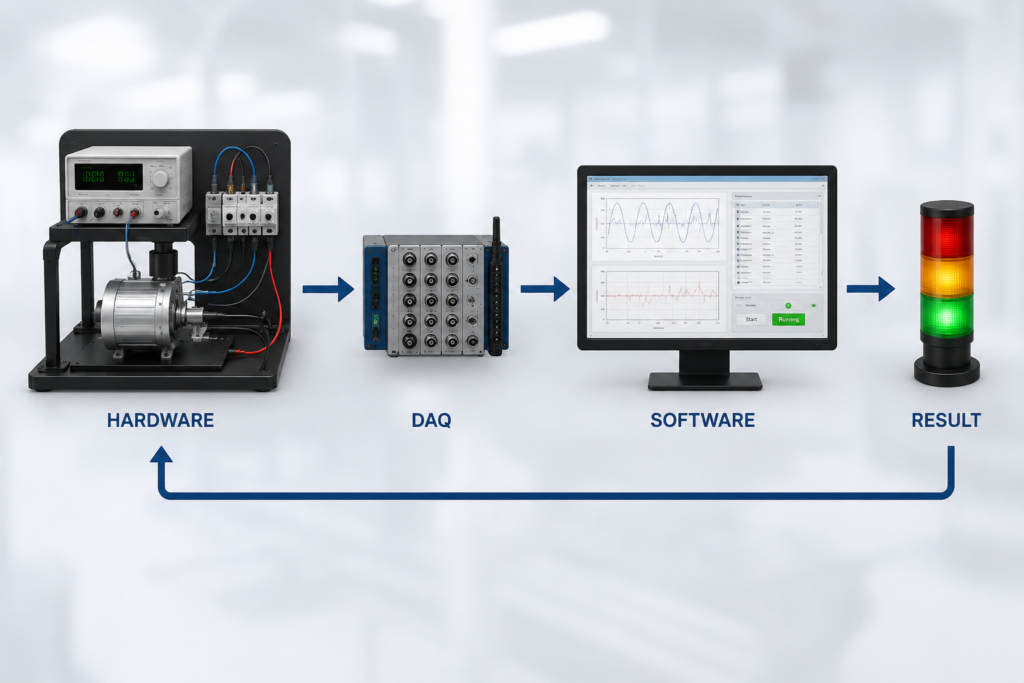
The integration between these stages is what allows an automated test system to execute complex and repeatable testing processes.
Why Integration Matters
Using individual high-quality instruments does not automatically guarantee reliable test results. The components must be properly integrated and configured around the actual test requirements.
Measurement Errors
Incorrect signal conditioning, unsuitable measurement ranges, electrical noise, or sensor problems can affect acquired data.
Timing and Synchronization
When multiple parameters need to be measured together, differences in channel timing can affect the interpretation of dynamic test results.
Hardware-Software Communication
Poor communication or control logic can lead to incorrect test sequences, delayed measurements, or unexpected equipment states.
Incorrect Test Limits
Even accurate measurements can produce incorrect pass/fail results if the defined limits or evaluation logic are incorrect.
Poor Traceability
If test results are not properly associated with the tested product and its measurements, investigating failures or reviewing test history becomes difficult.
A properly designed automated test system therefore treats hardware, software, DAQ, and measurement equipment as one integrated solution.
Key Considerations When Designing an Automated Test System
Before selecting hardware or developing software, the test requirements should be clearly defined.
1. Define Test Parameters
Identify the parameters to be measured, signal types, acceptable limits, number of test points, and required measurement speed.
2. Select Suitable Hardware
Consider:
- Accuracy
- Measurement range
- Response time
- Channel count
- Communication interfaces
- Future expansion
3. Plan the DAQ Architecture
Consider sensors, signal conditioning, sampling requirements, resolution, synchronization, and isolation.
4. Develop Modular Software
A modular architecture makes it easier to add test steps, integrate instruments, modify test limits, and maintain the system.
5. Plan for Traceability
Important information can be associated with each product:
Product ID → Test Sequence → Measurement Data → Limits → Result → Timestamp
This provides a structured record of the testing process.
6. Consider Future Expansion
The system architecture should allow additional instruments, channels, test parameters, or product variants to be incorporated when required.
Example: Automated Test System for Pump Performance Testing
Consider an automated pump performance testing application.
A typical setup may include:
Pump → Sensors → DAQ → LabVIEW → Test Logic → Result/Report
During the test:
- The system starts the predefined test sequence.
- Sensors measure parameters such as pressure, flow, and temperature.
- DAQ hardware acquires the measurement signals.
- LabVIEW processes the acquired data.
- The software calculates the required performance parameters.
- Measurements are compared with predefined limits.
- The system generates and stores the test results.
This approach reduces dependence on manual readings while providing a more consistent and traceable testing process.
The exact sensors, DAQ configuration, hardware, and software architecture depend on the product and test requirements.
Benefits of a Well-Integrated Automated Test System
A properly designed automated test system can support:
Repeatable Testing
The same predefined sequence can be executed consistently across multiple products.
Reduced Manual Intervention
Automated sequencing and measurement reduce repetitive manual operations.
Improved Traceability
Test measurements and results can be associated with individual products or test cycles.
Faster Data Evaluation
Software can automatically process and evaluate measurements instead of relying entirely on manual review.
Flexible Testing
A modular architecture makes it easier to modify test sequences and integrate additional hardware.
Scalable Test Operations
A well-planned system can expand as test parameters, channels, or product variants increase.
Conclusion
An Automated Test System brings hardware, software, sensors, measurement equipment, and DAQ together to create a coordinated testing process. When these elements are properly integrated, the system can improve test repeatability, measurement accuracy, traceability, and overall testing efficiency while reducing dependence on repetitive manual operations.
For LabVIEW-based test automation, data acquisition, measurement and testing, or customized automated test systems, the right solution depends on the product, test parameters, measurement requirements, and workflow. A well-planned system architecture helps ensure reliable testing today while providing flexibility for future test requirements.