
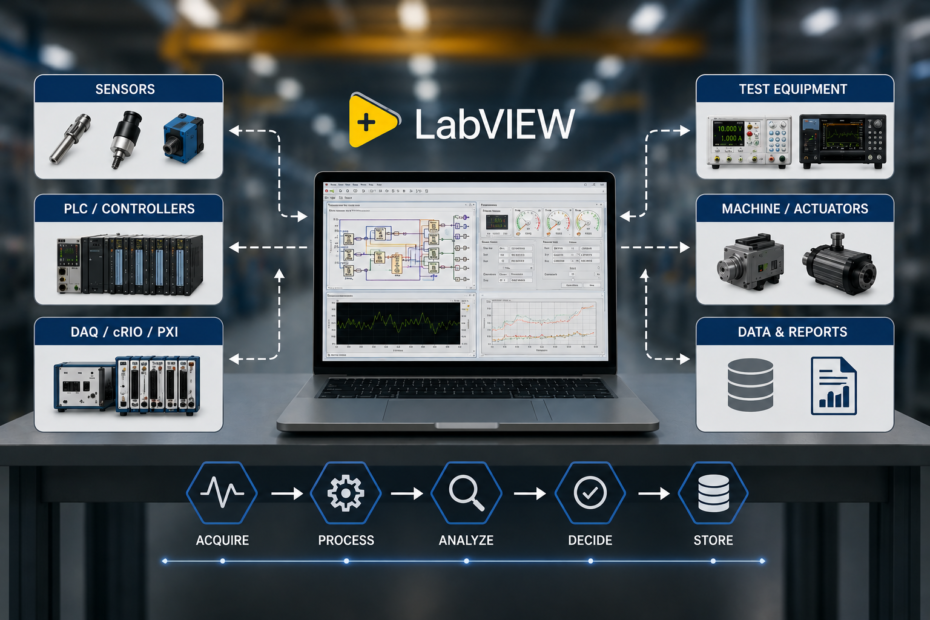
If you search “LabVIEW” today, you’ll find dozens of pages with the same definition: a graphical programming language from National Instruments, used for data acquisition and instrument control.
That’s correct. It’s also not very useful.
It doesn’t explain why a platform that’s over three decades old still runs test benches, EOL stations, and machine controllers across automotive, aerospace, and industrial plants in 2026. It doesn’t explain why some LabVIEW systems run for ten years without trouble, while others turn into a mess within two years. And it doesn’t answer the question most machine builders and system integrators actually want answered:
“Should our next machine be built on LabVIEW—and if so, how can we avoid repeating the problems we’ve faced before?”
Let’s answer that properly.
The Misconception: “LabVIEW Is Just a Programming Language”
Most explanations treat LabVIEW as just a coding tool — a graphical version of C# or Python, where you drag blocks instead of typing code. That misses the point.
LabVIEW isn’t useful because it’s graphical. It’s useful because it was built for one specific job: connecting software to the real, physical world — sensors, instruments, PLCs, and industrial equipment — with a level of hardware timing and control that regular programming languages simply weren’t built for.
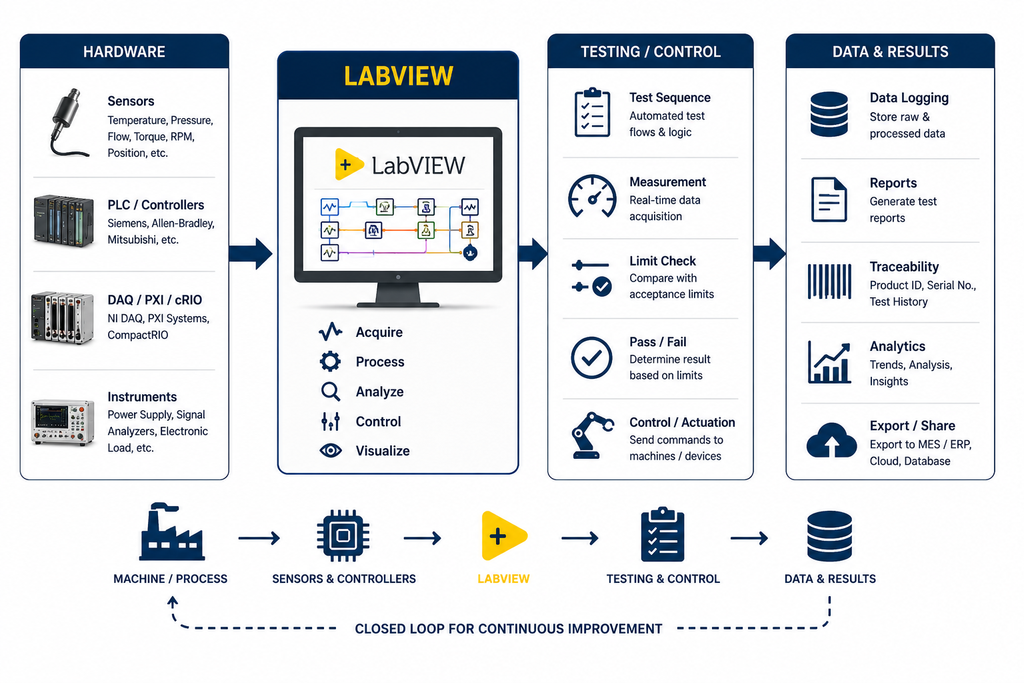
Most languages are designed to handle data, logic, and screens. LabVIEW — sometimes called the “G” programming language inside NI — was designed to handle signal acquisition, timing, hardware syncing, and measurement first, and everything else after. That’s why it’s so strong in test and measurement, virtual instrumentation, and machine control — and why it struggles when people try to use it for things it was never meant for, like a company website or a business app.
This is the real question to ask before choosing LabVIEW: not “is it a good language,” but “does this system need tight, hardware-level control?” If so, LabVIEW can often be one of the fastest & most reliable ways to get there. If no, it may not be the right tool at all — more on that below.
What LabVIEW Actually Does Well
Cut through the marketing, and LabVIEW’s real strengths come down to four things.
1. It talks to hardware without extra work. LabVIEW comes with strong, ready-made support for NI DAQ, PXI, and CompactRIO (cRIO) hardware, and connects fairly easily to third-party instruments, PLCs, torque sensors, and scanners over RS232, Ethernet, TCP/IP, and Modbus. Protocols like EtherCAT and Profinet usually need an extra NI communication module — worth knowing before you plan a project — but it’s still far less work than building all those connections from scratch.
2. It handles many things at once, the way a machine does. A real machine never does just one thing at a time. It’s reading a sensor, watching a safety switch, saving data, and updating a screen — all together. LabVIEW’s design makes this kind of multitasking easy to build, while regular programming languages need much more careful, manual work to do the same thing.
3. Real-time control needs the right setup, not just LabVIEW. Running LabVIEW on a normal Windows PC gives you good multitasking, but not true real-time precision — Windows itself isn’t built for that, so small timing delays can still happen. True real-time, predictable control needs the LabVIEW Real-Time module along with real-time hardware like CompactRIO or a PXI controller. This matters a lot for safety systems and precise control loops, and it’s a common misunderstanding — not every LabVIEW system is automatically “real-time.”
4. Long life, but it still needs upkeep. LabVIEW systems built ten years ago are often still running today — rare in the software world. But “still running” doesn’t always mean “easy to maintain.” Old LabVIEW versions, outdated hardware, and undocumented code can make an old system hard to update. Longevity is a real strength, but only if the system is kept current.
The Costliest Misconception: “LabVIEW Code Doesn’t Scale”
This is the complaint we hear most from machine manufacturers and system integrators considering LabVIEW: “We tried it before, and it turned into a maintenance nightmare.”
Here’s what’s usually true once we look closer: the platform didn’t fail — the way it was built did.
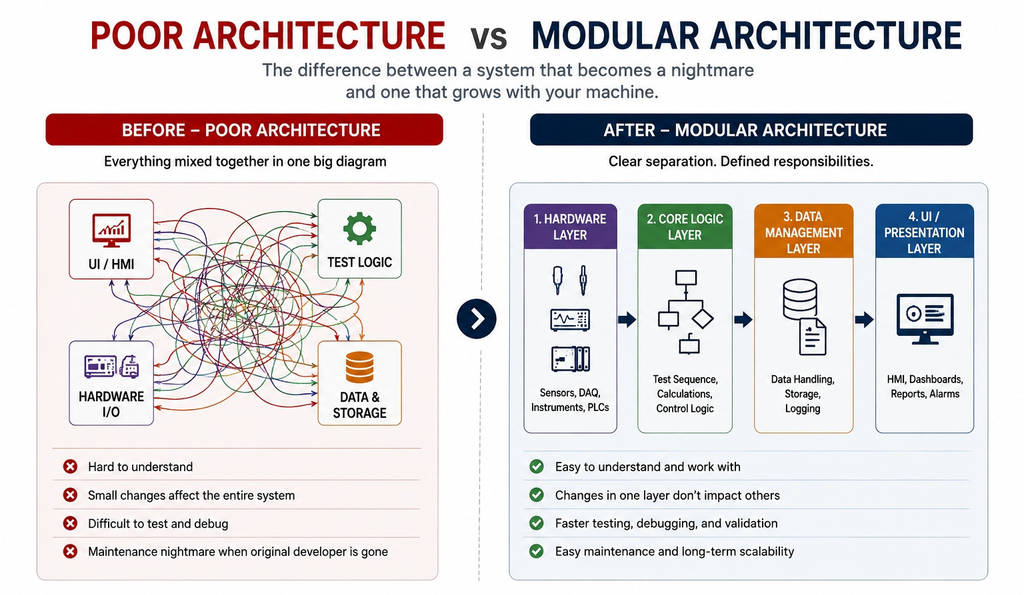
Before
A test engineer builds a working LabVIEW system under time pressure. It works. Six months later, someone needs to add a feature — but there’s no clean separation between the screen, the hardware, and the logic. Everything is tangled into one large diagram, so even a small change means re-testing the whole thing. Two years later, the original developer is gone, nobody wants to touch the code, and the company starts blaming LabVIEW.
After
Same functionality, but built properly — separate, clearly labelled sections for hardware, core logic, data handling, and the screen, with clean connections between each part. A new engineer can open the project, understand it within a day, and safely change one part without breaking the rest. The system that “became unmaintainable” in two years in the first case is still growing and working fine five years later in the second.
The difference isn’t the language. It’s whether the system was actually engineered — or just put together under a deadline. This is the real gap between writing LabVIEW code and building a proper LabVIEW system, and it’s the biggest factor in whether a machine automation project pays off or becomes a headache.
When LabVIEW Is Not the Right Choice
Being fair to LabVIEW also means being honest about where it doesn’t fit well:
- Web and business apps. For a customer website or an office/business app built mainly around screens and business logic, regular web tools are a better, easier-to-staff choice.
- Large software teams and big data/AI work. If a project needs a large team of general developers, or heavy data science and AI work, Python’s much bigger talent pool and toolset usually wins.
- Cloud systems, or no hardware at all. LabVIEW isn’t built for cloud-native apps, and if a project doesn’t touch sensors, instruments, or industrial equipment, its biggest strength — and its cost — simply isn’t worth it.
None of this makes LabVIEW less valuable where it does fit. It just means the choice should depend on the actual problem — hardware or no hardware — not on habit.
A Question Worth Asking Before Your Next Project
If you’re running — or planning — a machine control or test system, ask this: “If the engineer who built this left tomorrow, could someone else maintain or fix it within a week?”
Most companies can’t say yes. That one question tells you more about the health of a system than any code review, because it tests what really matters over a machine’s life — not whether it works today, but whether it stays workable.
If your honest answer is “not sure,” that’s not really a LabVIEW problem. It’s a design and ownership problem — and it’s fixable, without starting over, if you catch it early.
Where LabVIEW Fits Today
LabVIEW isn’t the right tool for everything, and treating it like one is its own mistake. But for hardware-driven test sequences, industrial data logging, SCADA and HMI-based machine control, and tying together protocols like EtherCAT, Modbus, and Profinet, it’s still one of the most proven platforms out there.
The companies that get the most value from it don’t treat it as “just a coding tool.” They treat their LabVIEW system like any other critical piece of machine engineering — with proper design, clear ownership, and a long-term plan for who maintains it.
Frequently Asked Questions
Yes — especially in test and measurement, EOL testing, and machine control, where hardware integration
matters more than general coding speed. It’s less useful for web, mobile, or general business software.
The basics are easy to pick up, especially for engineers who already think in terms of signals and systems.
Building large, well-structured LabVIEW applications takes real experience — just like with any other
language.
No, not automatically. Standard LabVIEW on Windows gives good multitasking but not true real-time
precision. Real deterministic control needs the LabVIEW Real-Time module with hardware like
CompactRIO or a PXI controller.
Yes — usually over Modbus, Profinet, or EtherCAT (the last two often need an extra communication
module) — which makes it a common bridge between PLC-driven machines and test/data systems.
It depends on the job. For hardware-heavy, timing-sensitive systems, LabVIEW’s built-in instrument support
usually wins. For data science or software with no direct hardware, Python is usually the stronger choice.
Where the Real Risk Begins
Your machine may already have the right sensors, the right PLC, and the right hardware. But if the software connecting them isn’t built to last, the machine will still struggle on the shop floor — and the cost shows up later, as downtime, a messy codebase, or a system nobody wants to touch.
That’s the layer where LabVIEW earns its reputation — or loses it.
Puja Controls builds and fixes LabVIEW-based automation, testing, machine control, and traceability systems for machine manufacturers, system integrators, and industrial OEMs. Weighing LabVIEW for a new machine, or trying to make sense of a system you already have? Send us the details — we’ll give you a straight, engineering-first read on it, no obligation attached.